
Knowledge
Zowie Knowledge serves as the central information repository that powers your AI Agent's ability to deliver accurate, consistent, and personalized customer experiences. It consists of structured Policies that guide the AI's reasoning process, ensuring consistency and precision in customer interactions.
This product is currently being rolled out across different customer environments. Access to specific features might vary depending on your implementation. Please contact Customer Success for more information or to request access.
How does AI Agent generate response?
Zowie AI Agent leverages advanced RAG (Retrieval Augmented Generation) technology to:
- Semantically search your entire knowledge base—understanding the meaning behind questions
- Combine information from multiple policies to create comprehensive, contextual responses
- Deliver accurate information using only your approved content
- Process multi-language embeddings, enabling cross-language understanding
Why is Knowledge important?
A properly structured Knowledge system offers numerous advantages that directly impact your AI Agent's performance:
- Enhanced Response Accuracy: Provides precise answers based on your specific company policies, resulting in contextually relevant responses that significantly improve customer satisfaction
- Consistent Customer Experience: Maintains uniform information delivery across all channels
- Personalization: Tailors responses to different customer profiles and needs, ensuring customers receive only information relevant to their situation based on Segments and Regions
- Improved Automation Rates: Increases the AI's ability to handle inquiries independently—well-structured knowledge can boost automation rates by 20-30%
Multi-language support
Zowie supports 39 languages through advanced multi-language embeddings:
- Maintain Primary Language: Focus on quality content in your primary language
- Leverage Automatic Translation: Let the AI handle translation to other supported languages
- Consider Regional Variations: Note regional differences in policy application
Read more about our Language support here.
Key Elements of Knowledge
The Zowie Knowledge interface provides several powerful features that help you manage information effectively. This section guides you through the most important elements you'll use regularly.
Knowledge Dashboard
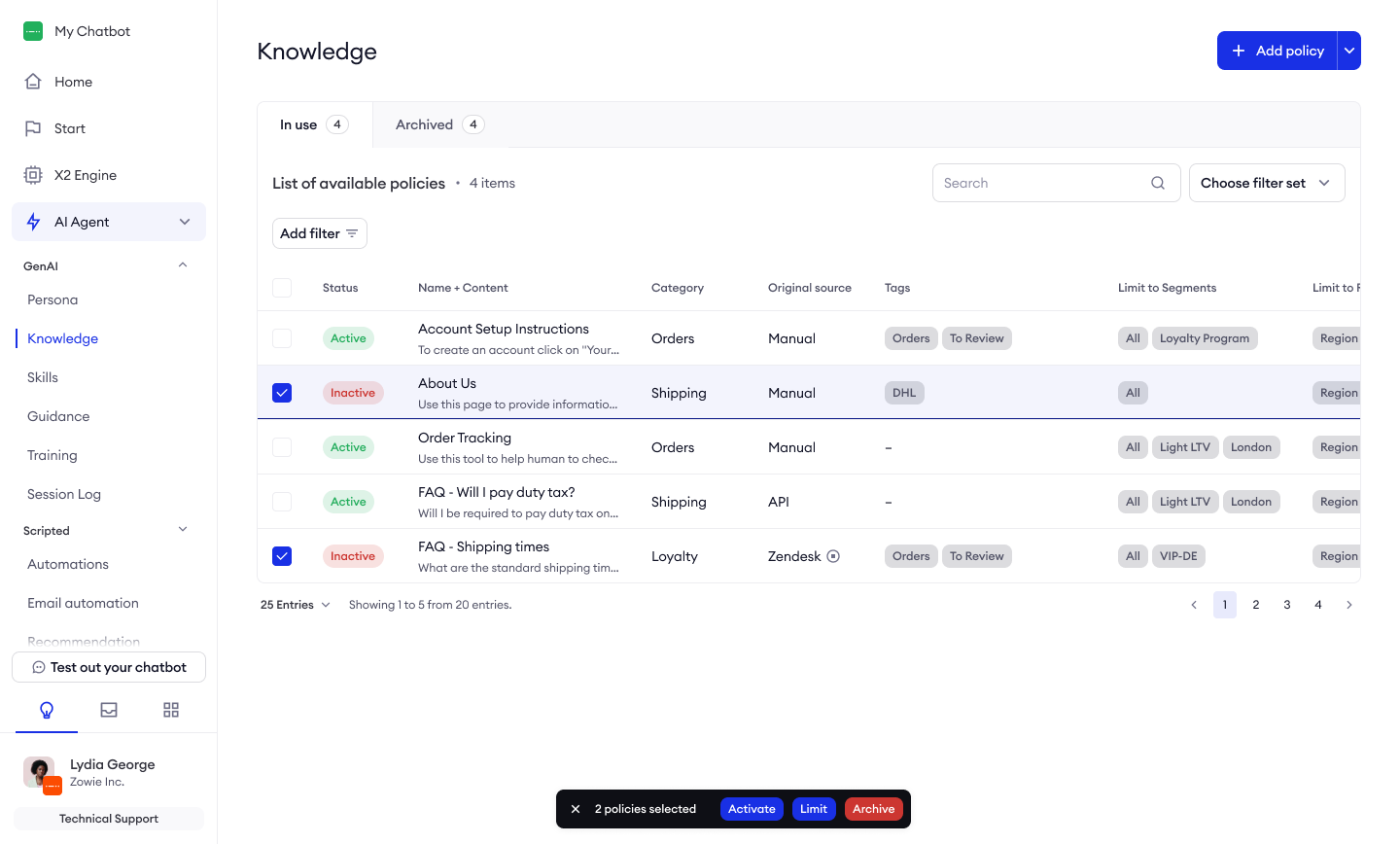
Your Knowledge dashboard is the command center for managing all your policies. Key elements include:
- Policy List: Central view displaying all your policies with status indicators
- Action Bar: Contains buttons for adding new policies and bulk actions
- Filter Panel: Allows you to narrow down policies by various criteria
- Search Function: Enables you to quickly find specific policies through title or content
Policy Creation and Import
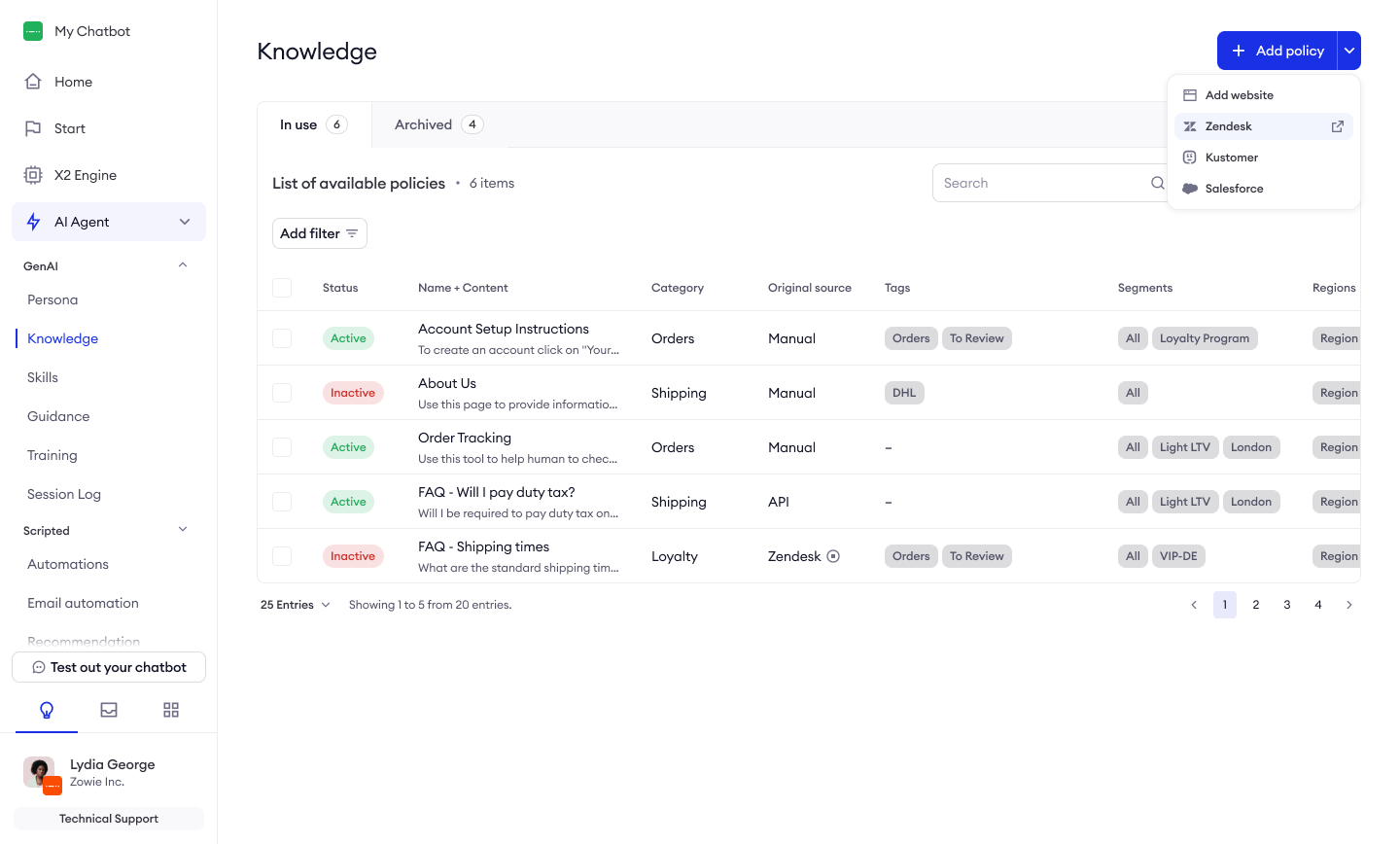
Zowie offers multiple ways to add information to your Knowledge base:
- Manual Creation: Create policies directly within the platform
- External Import: Connect to and import from:
- Zendesk
- Kustomer
- Salesforce Knowledge Base
- Websites (using the selector tool)
- Custom API integration
Filtering and Search
Find exactly what you need with powerful filtering options:
- Status Filtering: View enabled/disabled policies
- Source Filtering: Filter by original source (Manual, Zendesk, Kustomer, etc.)
- Sync Status: See which policies are in sync with external sources
- Last Updated: Find recently modified policies
- Tag Filtering: Filter by custom tags
- Segments and Regions: View policies assigned to specific groups
The search function highlights matching text in both policy titles and content, making it easy to locate specific information.
Segmentation and Regionalization
Deliver personalized support with targeted knowledge:
- Segments: Assign policies to specific customer groups (e.g., premium customers, new users)
- Regions: Create geographic-specific policies (e.g., EU regulations, US shipping policies)
Example Use Case: A clothing retailer can show different return policies to customers in different countries, ensuring each customer sees only the information relevant to their location.
Version Control and Change History
Track and manage policy modifications:
- Change Log: View who made changes, what was modified, and when
- Version Restoration: Revert to previous versions if needed
- Sync Management: Break synchronization to edit imported policies, or restore sync to update from the original source
Best Practice: When troubleshooting AI response issues, check the change history to see if recent policy modifications might have affected performance.
Getting Started with Knowledge
For optimal results, follow this step-by-step process to set up your Knowledge:
- Plan your knowledge structure
- Identify common customer questions
- Map out logical categories based on your business type
- Define priority areas to tackle first
- Import existing content
- Connect to external sources (Zendesk, Kustomer, Salesforce)
- Import relevant website content using the selector tool
- Review imported content for quality and relevance
- Create additional policies manually
- Fill knowledge gaps not covered by imported content
- Structure each policy around a single, clearly defined topic
- Format content with clear headings and simple organization
- Organize and categorize
- Apply relevant tags to each policy
- Assign policies to appropriate segments and regions
- Group related policies using consistent categories
- Activate strategically
- Begin with a small set of high-quality policies
- Activate policies in batches, starting with high-volume topics
- Leave complex or uncertain policies inactive until reviewed
- Test and refine
- Verify AI responses using common customer questions
- Review session logs to identify which policies are being used
- Adjust policy content based on performance data
- Expand and optimize
- Gradually add more policies to cover additional topics
- Regularly update existing policies to maintain accuracy
- Use analytics to identify knowledge gaps
This process is iterative—start with quality over quantity, then expand your knowledge base as you learn what works best for your customers.
Updated over 1 year ago