
How to connect Zowie to your external APIs?
Business Context
High deflection/containment rate of automation can be supported by introducing personalized automations via integrations with systems (CRM, ecommerce, subscription, logistics platforms, etc.) to access user information or perform actions on behalf of these users. Zowie offers built-in capabilities to integrate with external APIs. The goal of this document is to describe them.
Definitions
| Terms | Definition |
|---|---|
| System(s) | Your system eg. CRM, ecommerce, subscription platform we want to integrate with. |
| User | Your customers, who are interacting with chat/email automation. |
Types of integrations
Depending on business requirements we distinguish different levels of integrations, that can be used to provide personalized experience:
- Context passing - you can provide context of a User, which may include their name, email, segment or any custom property. The goal of context passing is to provide Zowie with User specific information. This is the easiest way to pass any information you have about a User from your website/application.
- Pulling User specific data - Zowie can integrate with your HTTP API (REST, GraphQL, etc.) and make synchronous API calls to these Systems to pull User-specific data. Once we receive a JSON response, we can use multiple built-in manipulation and condition features to provide a User with tailored response.
- Acting on behalf of User - the same mechanism which is used for pulling User information can be used as well to act on behalf of a User. Thanks to built-in integration capabilities we can make API calls to trigger User-specific actions or update User-specific data within your Systems.
Zowie offers multiple authentication mechanisms for Pulling User specific data and Acting on behalf of User. You can learn more about them by reading Recommended Chat Authentication Methods.
Context Passing
All Zowie entry points (Website Widget, iOS, Android SDKs) support passing metadata about a User. We support the following format of metadata object:
{
  "firstName": "Tom",
  "lastName": "Zowie",
  "locale": "en-US",
  "timezone": "GMT+2",
  "phoneNumber": "+1 982 888 291",
  "email": "[email protected]",
  "extraParams": {
     "segment": "enterprise",
     "currentPlan": "professional"
  }
}
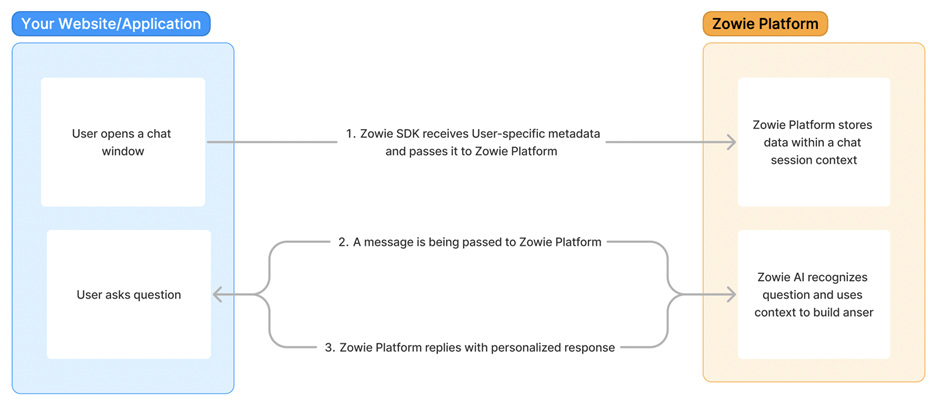
You can provide values for predefined fields, and also anything you need via extraParams object. Once you provide this context, Zowie SDK will automatically pass this information to Zowie Platform that can be used to offer personalized experience.
This diagram explains how data flow will look like:
You can learn more by reading our documentation:
Pulling User specific data / Acting on behalf of User
Zowie can easily integrate with your System’s API endpoints to make API calls. The integration can be configured using our built-in integration setup builder and doesn’t require any development.
The following diagram shows how this mechanism works:
Built-in integration builder is called REST Automation and offers the following capabilities:
| Feature | Description |
|---|---|
| Inputs collection | Values for API calls can be collected by asking Users to provide answers eg. “What is your transaction number?” or by referring to data you previously provided via a metadata object. |
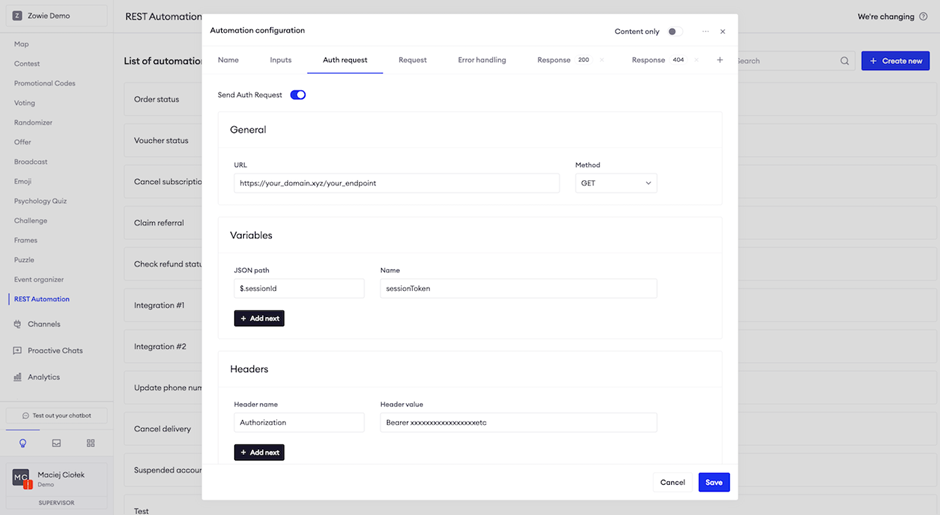
| Pre-authentication request | Can be used to support any authentication mechanism (eg. oAuth 1.0, oAuth 2.0, etc.) to generate a token before making the final API call. |
| Request builder | You can define API requests by providing url, method, headers and body. All of these values can be dynamically populated with any input (eg. transaction number) or metadata (eg. user email). |
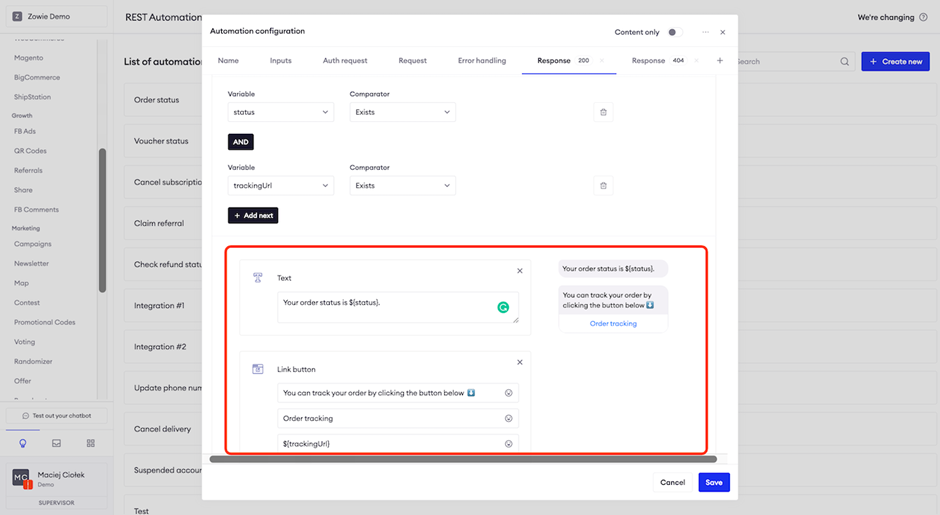
| Response status conditions | You can define different chatbot responses depending on response status code. |
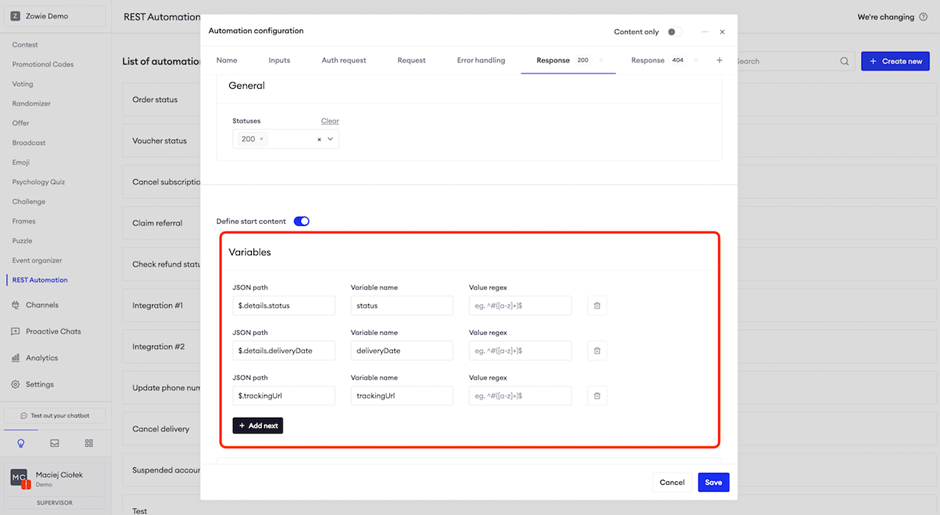
| Response data conditions | You can use JSON path notation to extract any data point from the response and use these values to build AND/OR conditions to personalize chatbot responses based on received data. |
| Response variables | Extracted values can be also used in any place for chatbot responses eg. “The amount of your transaction ${totalAmount}”. |
| Response array iteration | If your response includes arrays, you can iterate over them with built in sorting and filtering. |
You can configure REST Automation directly from Zowie UI, please find couple of screenshot of the experience:
We prepared a step-by-step tutorial on how to use our no-code REST Automation builder to integrate with your System’s APIs.
Updated over 1 year ago