
Zowie X2
Zowie X2 revolutionizes customer service with its cutting-edge GenAI technology. X2 is designed to enhance customer interactions, streamline response management, and provide a more efficient, personalized customer service experience.
X2 stands out for its ability to seamlessly integrate with existing customer service platforms, offering a significant upgrade in handling customer inquiries.
We are excited to announce that more innovative features will be introduced in the near future.
AttentionX2 has now entered its Early Access stage. To join the Early Access Program, please get in touch with your Customer Success Representative.
Key Features
- Improved Personalization: X2 utilizes GenAI (Generative AI built on top of LLM - Large Language Model) to understand and respond to customer needs in a more human-like manner, adapting to individual preferences and history.
- Efficient Information Management: X2 seamlessly integrates with existing help centers like Zendesk Help Center, allowing for efficient management of your knowledge base and quick access to relevant information.
- Guided Generative Responses: X2 offers the flexibility to create tailored response templates leveraging your existing content while ensuring that replies are aligned with your brand's voice and customer service ethos.
- Creative Response Generation: X2 employs its LLM (Large Language Model) to generate unique, context-aware responses, elevating the customer interaction experience beyond standard pre-written replies.
- Enhanced UI: X2 features a user-friendly interface that simplifies the management of chatbot responses and integration settings, making it accessible for users of all technical skill levels.
How to Set Up X2
This section will provide a step-by-step guide on integrating Zowie X2 with your existing systems.
It will cover everything from basic setup to advanced configuration, including setting the tone of voice, aligning the chatbot with your business context, and customizing response settings for optimal performance.
Connecting Your Zendesk Help Center with Zowie X2
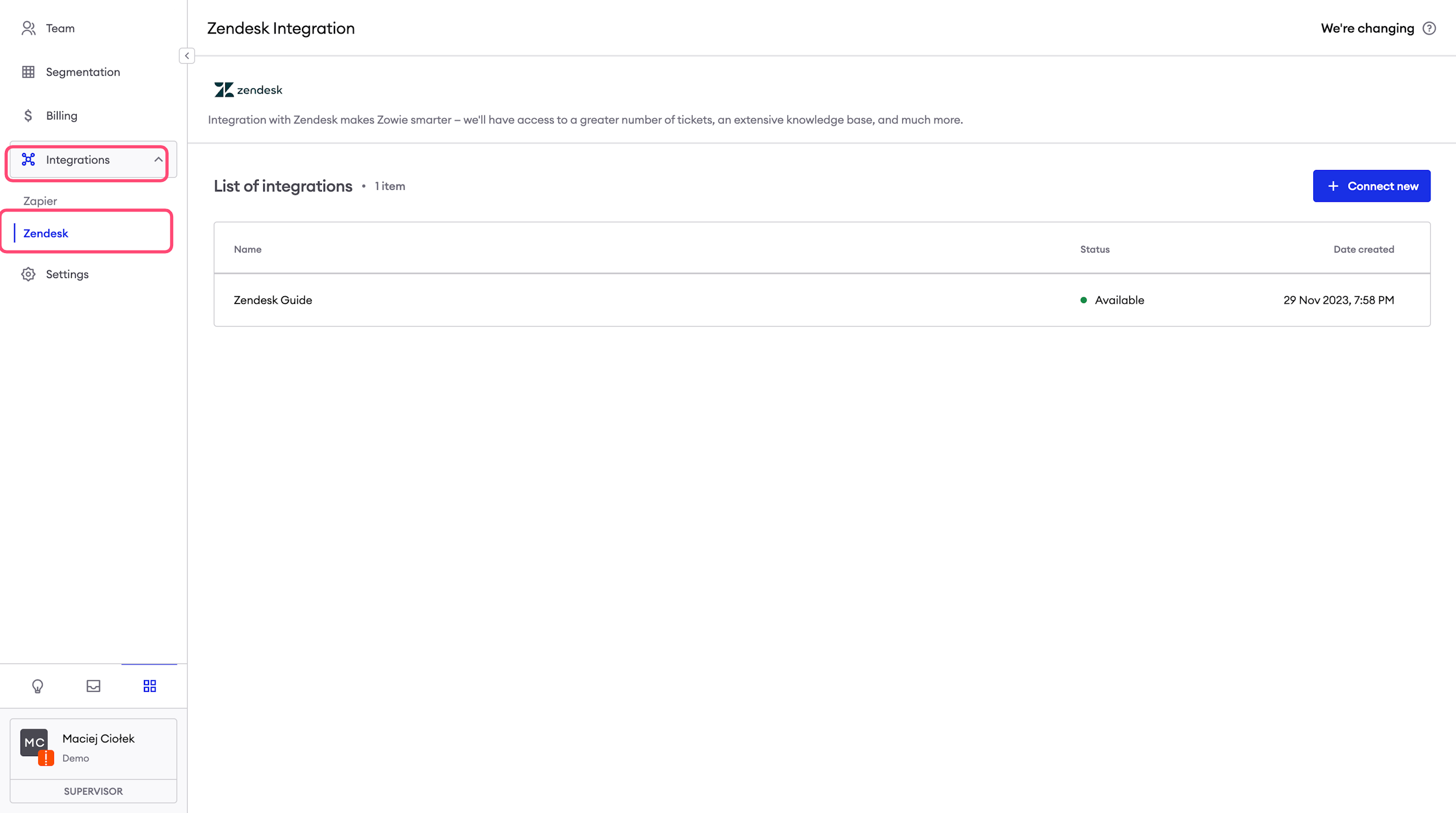
For customers utilizing Zendesk Help Center for FAQs, linking it to Zowie X2 is straightforward. Simply navigate to Workspace in your Zowie X2 dashboard, select Integrations and choose Zendesk.
This integration streamlines your FAQ management, ensuring seamless access and synchronization with Zowie X2's advanced response capabilities.
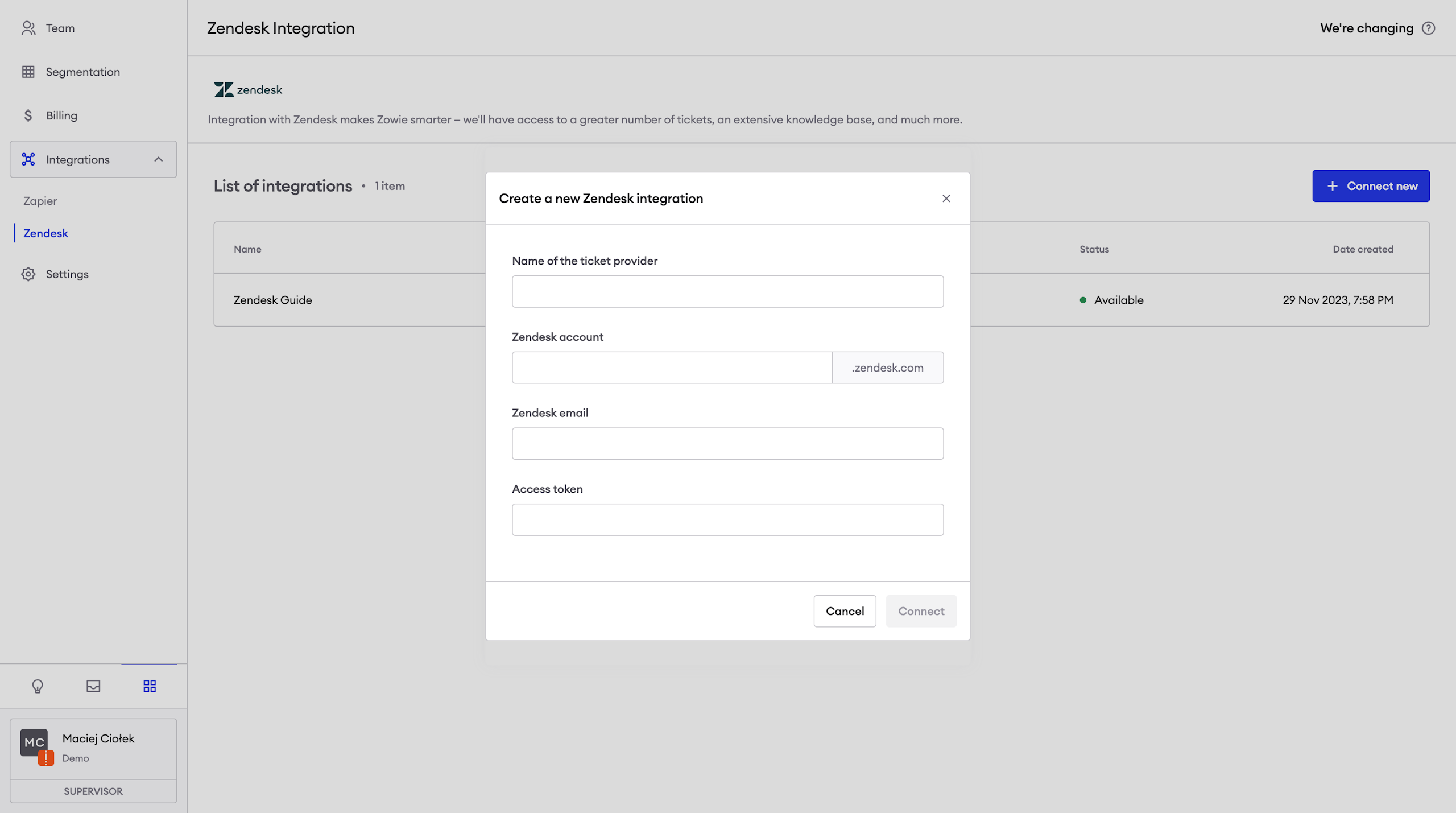
To complete the integration you need provide:
- Zendesk subdomain
- Zendesk admin email
- Zendesk API Key
Creating Custom Snippets for Zowie X2
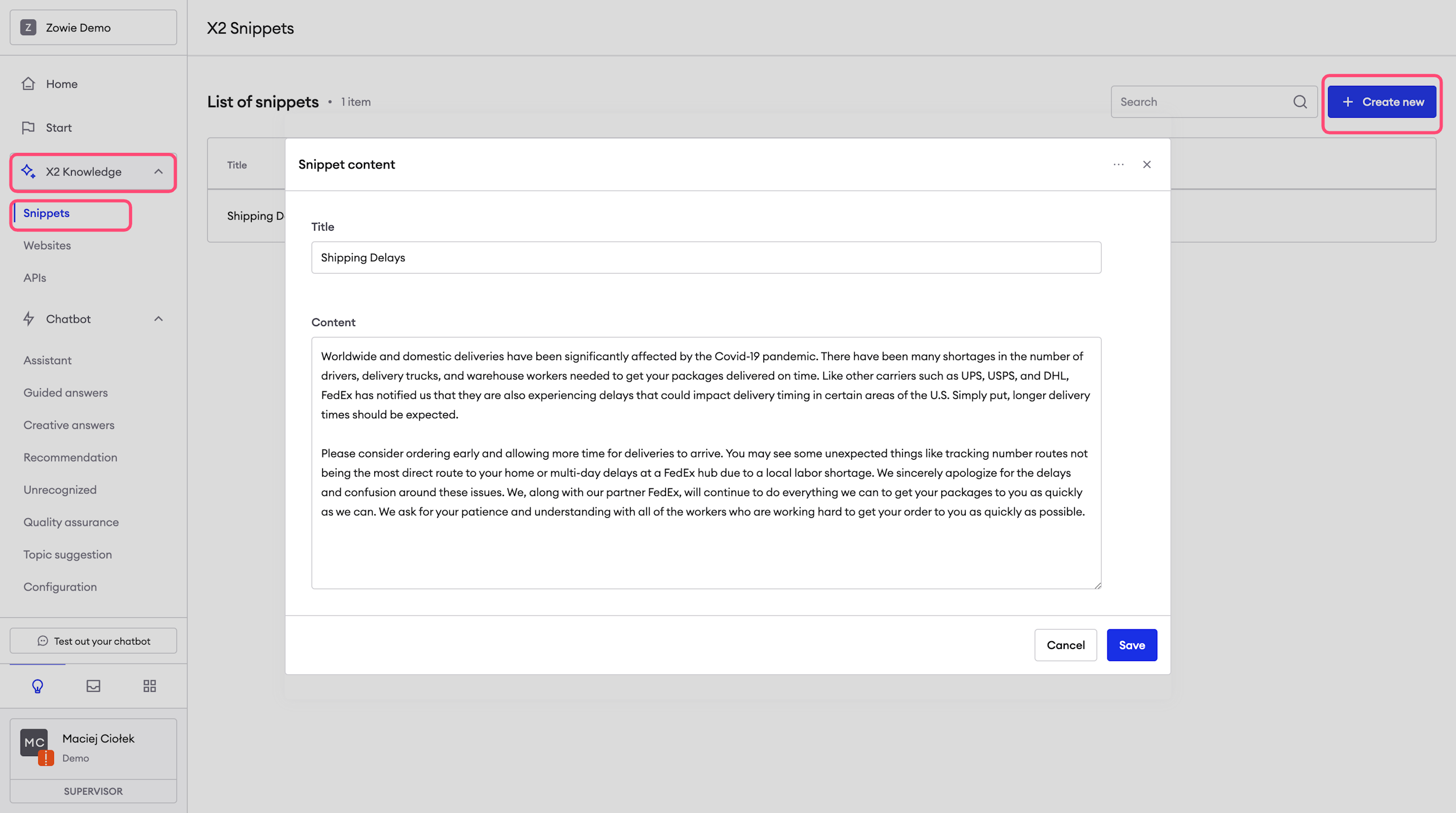
Zowie X2 allows you to define custom snippets for content that is either private or not meant for public access.
To add a new snippet, simply navigate to Chatbot on your Zowie X2 dashboard, then go to X2 Knowledge and select Snippet.
Here, you can create and manage multiple snippets, tailoring them to fit your specific customer service needs.
This feature ensures that your chatbot provides accurate, context-specific information while maintaining confidentiality where necessary.
Pro Tip:It’s recommended to have a snippet focused on a specific area/process of the business. X2 will use both title and content to understand the context of the content.
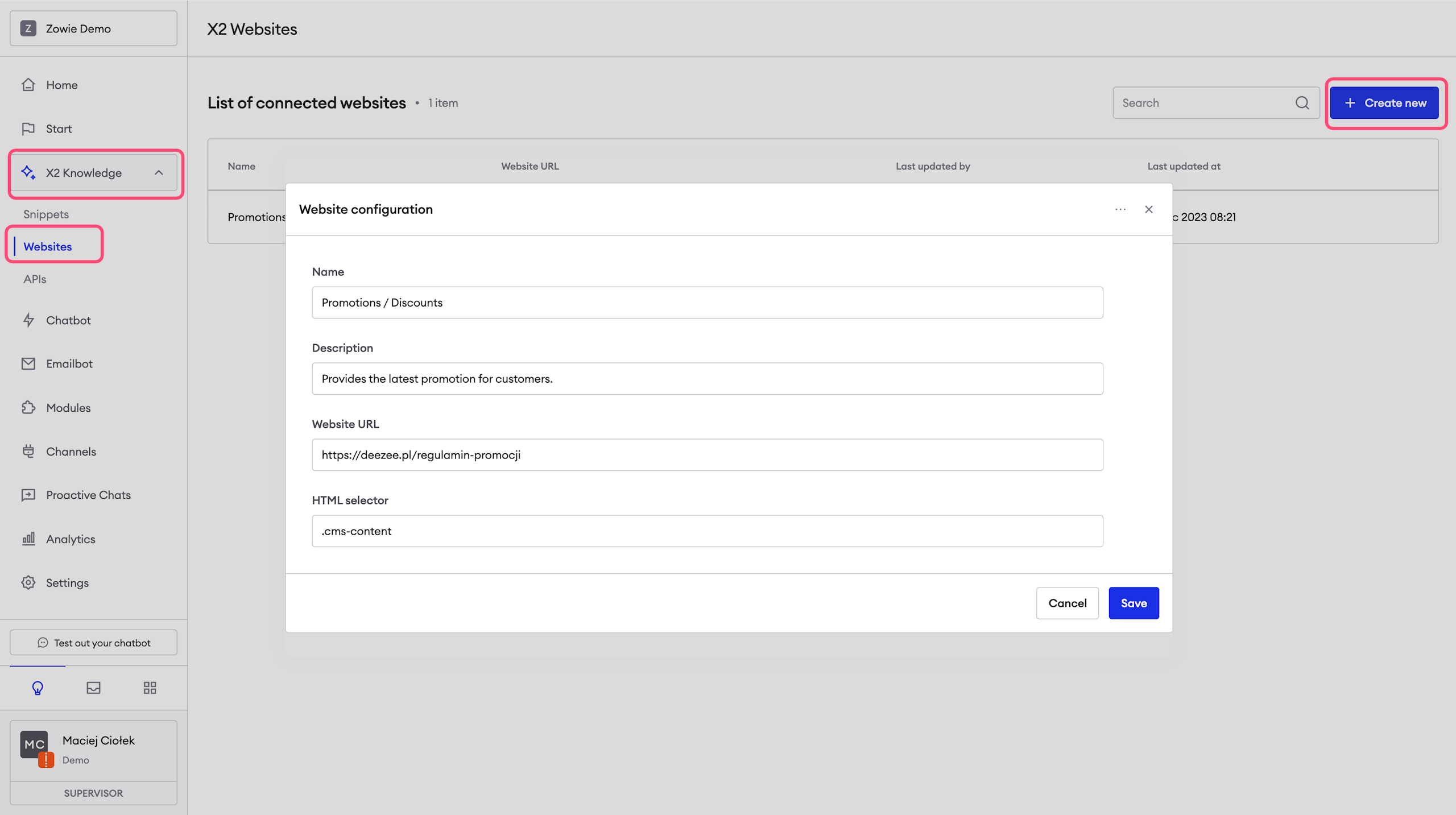
Integrating Custom Website Content with Zowie X2
Zowie X2 offers the capability to integrate your existing website content for enhanced answer provision.
To establish this connection, access Chatbot in your Zowie X2 dashboard, then go to X2 Knowledge and select Websites. Here, you can define specific website sources.
Utilize the HTML selector to pinpoint exact sections of your website for content extraction.
This integration ensures that Zowie X2 leverages your website's content effectively in its responses.
Pro Tip:For optimal configuration, consider consulting with your Customer Success Manager to identify the most effective HTML selector values.
AttentionTo enhance accuracy, performance, and quality, content from excessively lengthy websites will be automatically truncated to the initial 500 words.
This optimization is crucial for maintaining X2 system efficiency.
Integrating API Content with Zowie X2
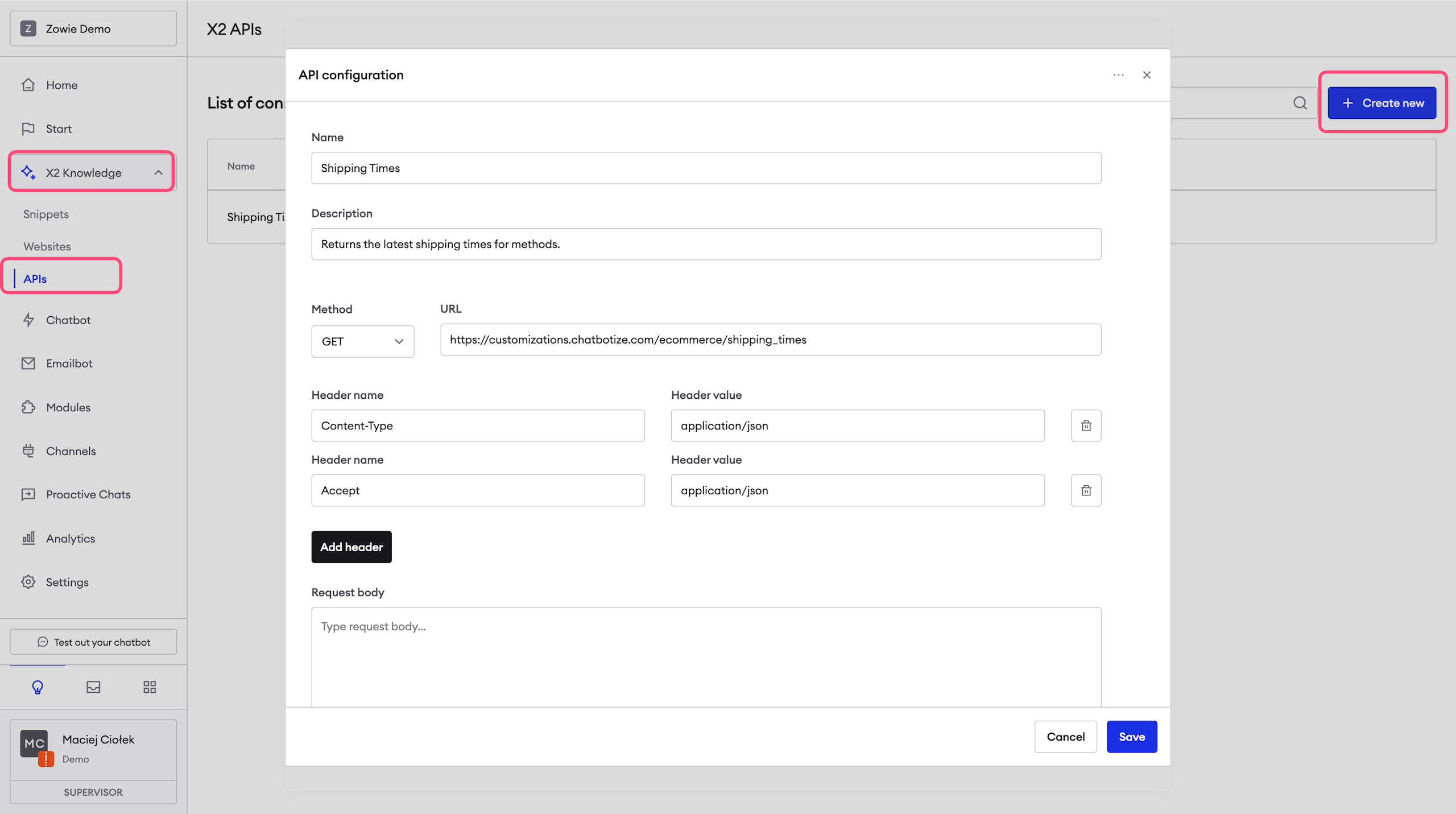
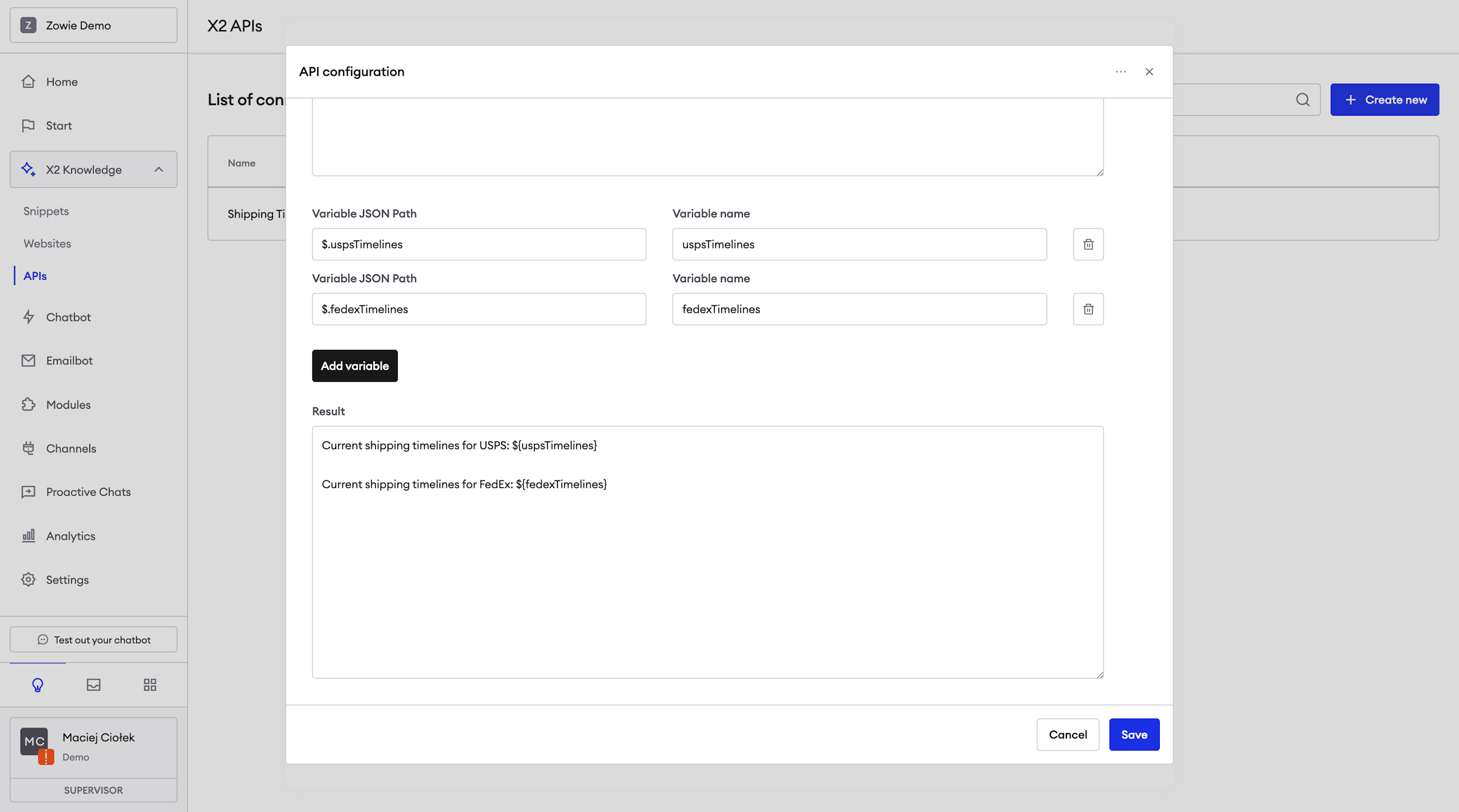
If you have APIs containing up-to-date information, Zowie X2 allows seamless integration.
Configure this by navigating to Chatbot in your dashboard, selecting X2 Knowledge, and then APIs.
This integration facilitates API calls using specified HTTP configurations and maps the JSON responses to Zowie X2 content.
For the time being, this feature is limited to pulling general information only. Therefore it should not be used for customer-specific (e.g., authenticated user) data.
AttentionPlease contact your Customer Success Manager as this feature may require help from Zowie Solution Engineer.
Tailoring Zowie X2's Brand Voice
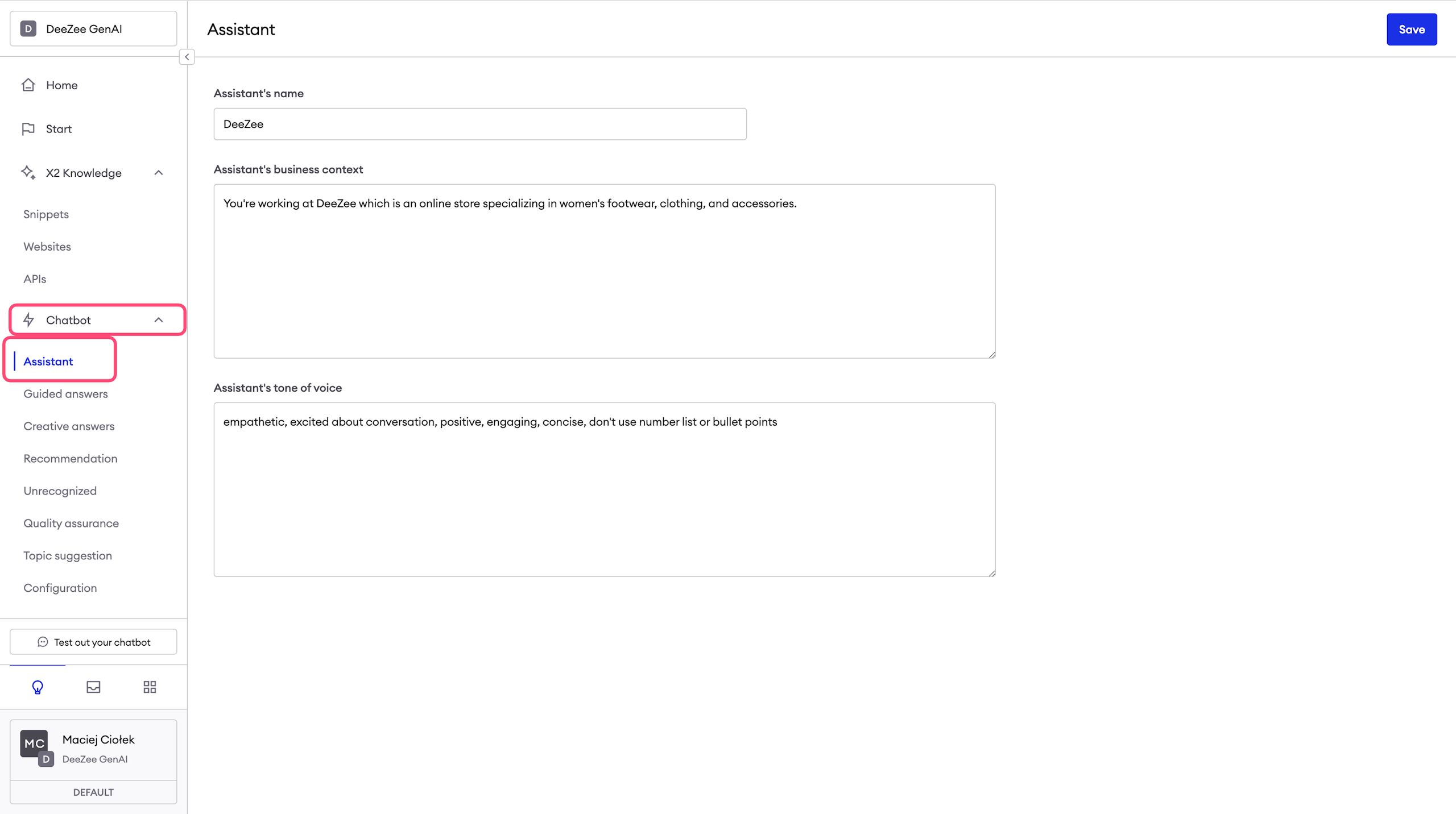
Customize Zowie X2's tone of voice to align with your brand's personality. Set this up in the dashboard under Chatbot → Assistant.
Here's what you can configure:
- Assistant’s Name: Give your assistant a unique name.
- Assistant’s Business Context: Briefly describe the assistant's operational context within your business.
- Assistant’s Tone of Voice: Use adjectives and concise sentences to define the desired tone of voice.
It is recommended to keep the descriptions succinct. A few words or a short sentence are ideal. The business context and tone can be updated over time to accommodate new guidelines or additional context.
This configuration helps ensure that your assistant communicates in a manner that's consistent with your brand's image and values.
Choosing Between Guided and Creative Answers
Zowie X2 offers two response types to cater to different customer service needs: Guided Answers and Creative Answers.
- Guided Answers: This answer type ensures accuracy by using intent recognition to understand customer queries. Zowie X2 then responds with pre-configured knowledge specific to the identified intent, reducing the chances of irrelevant or incorrect information.
- Creative Answers: For a more dynamic approach, this answer type allows Zowie X2 to autonomously search its Knowledge base to craft responses. While this fosters creative and varied answers, it carries a slight risk of selecting less precise content.
Choose the answer type that aligns best with your brand's approach to customer interaction, ensuring a balance between accuracy and creativity.
Configuring Guided Answers in Zowie X2
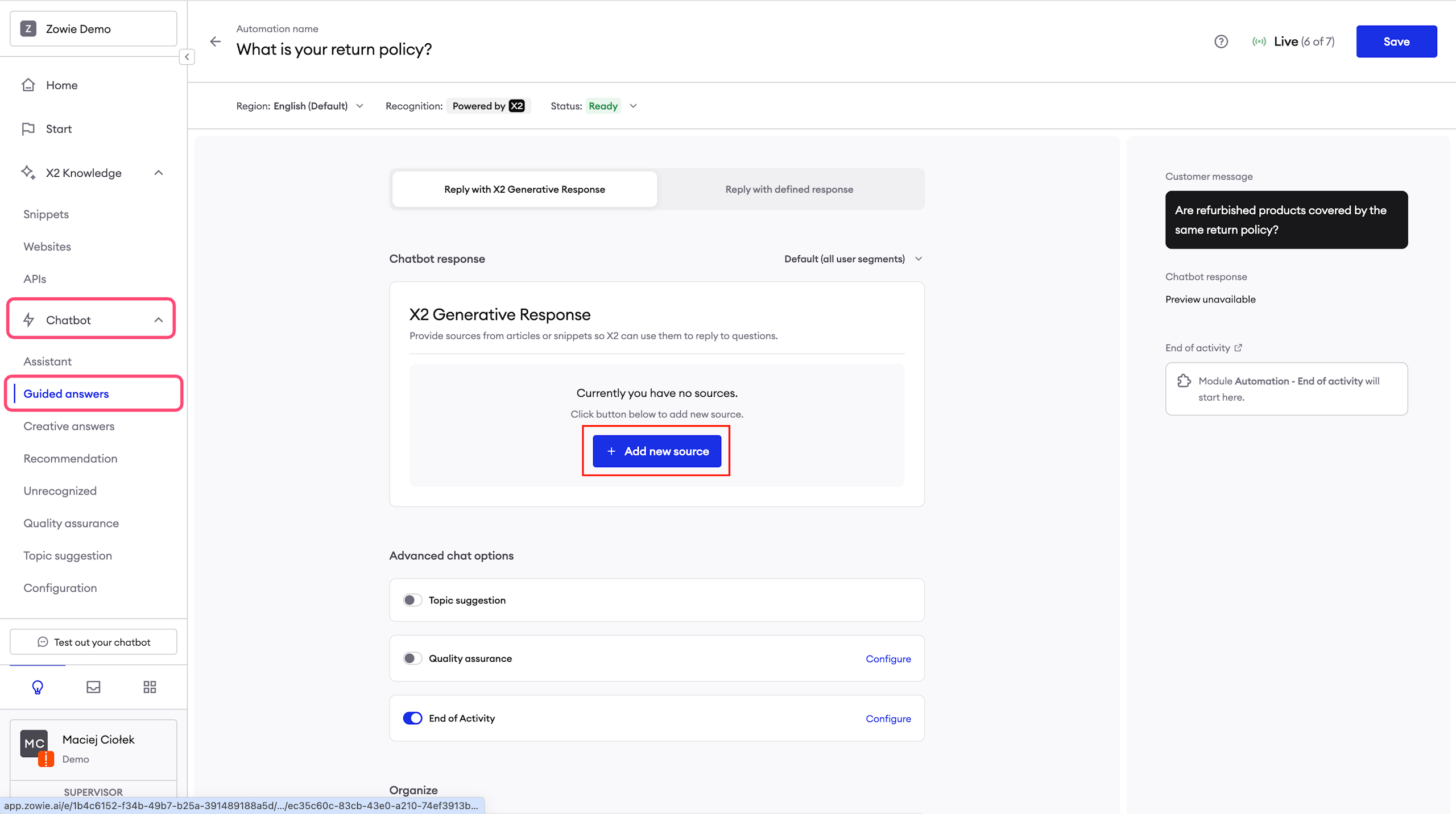
To set up Guided Answers in Zowie X2, navigate through Chatbot → Chatbot → Guided answers and select an automation to edit.
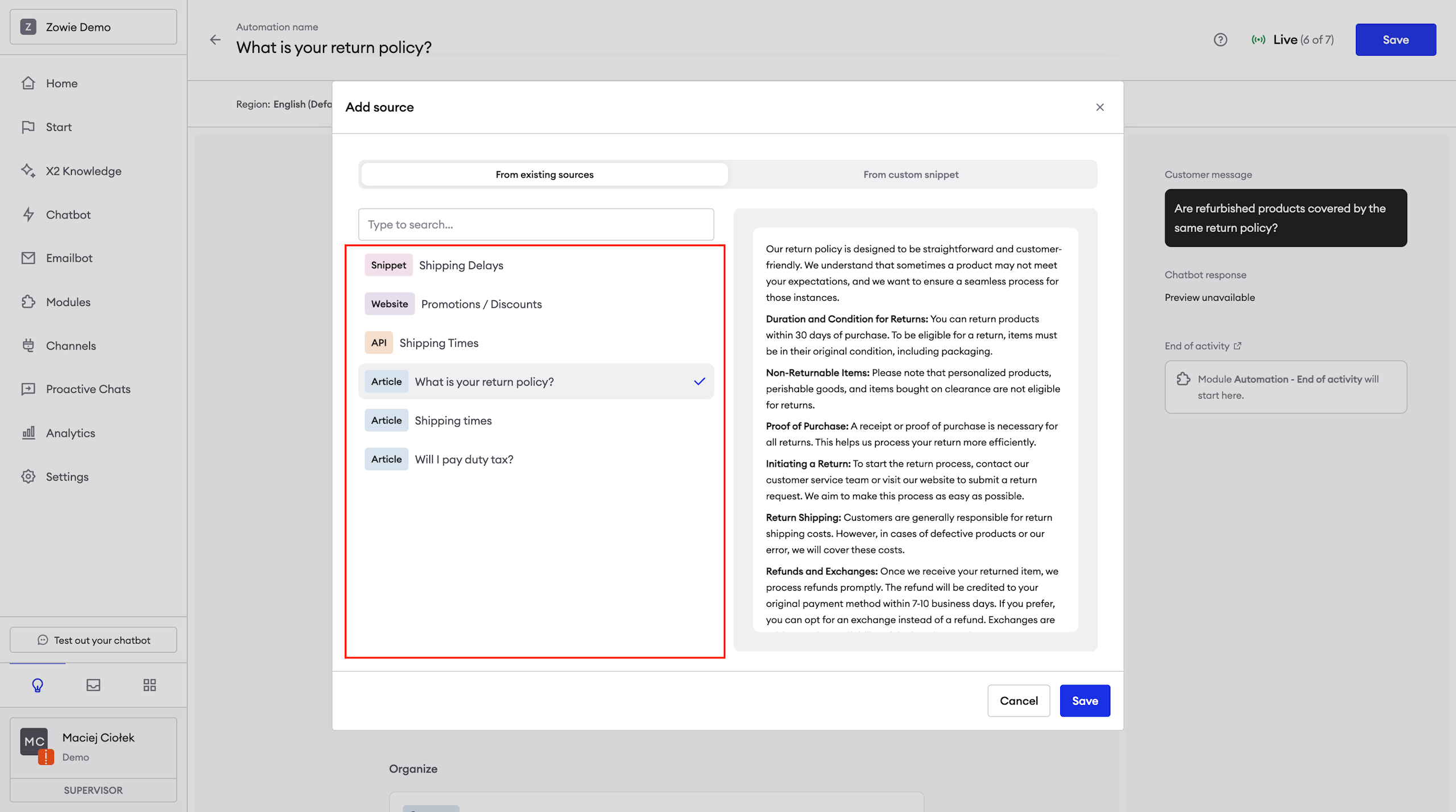
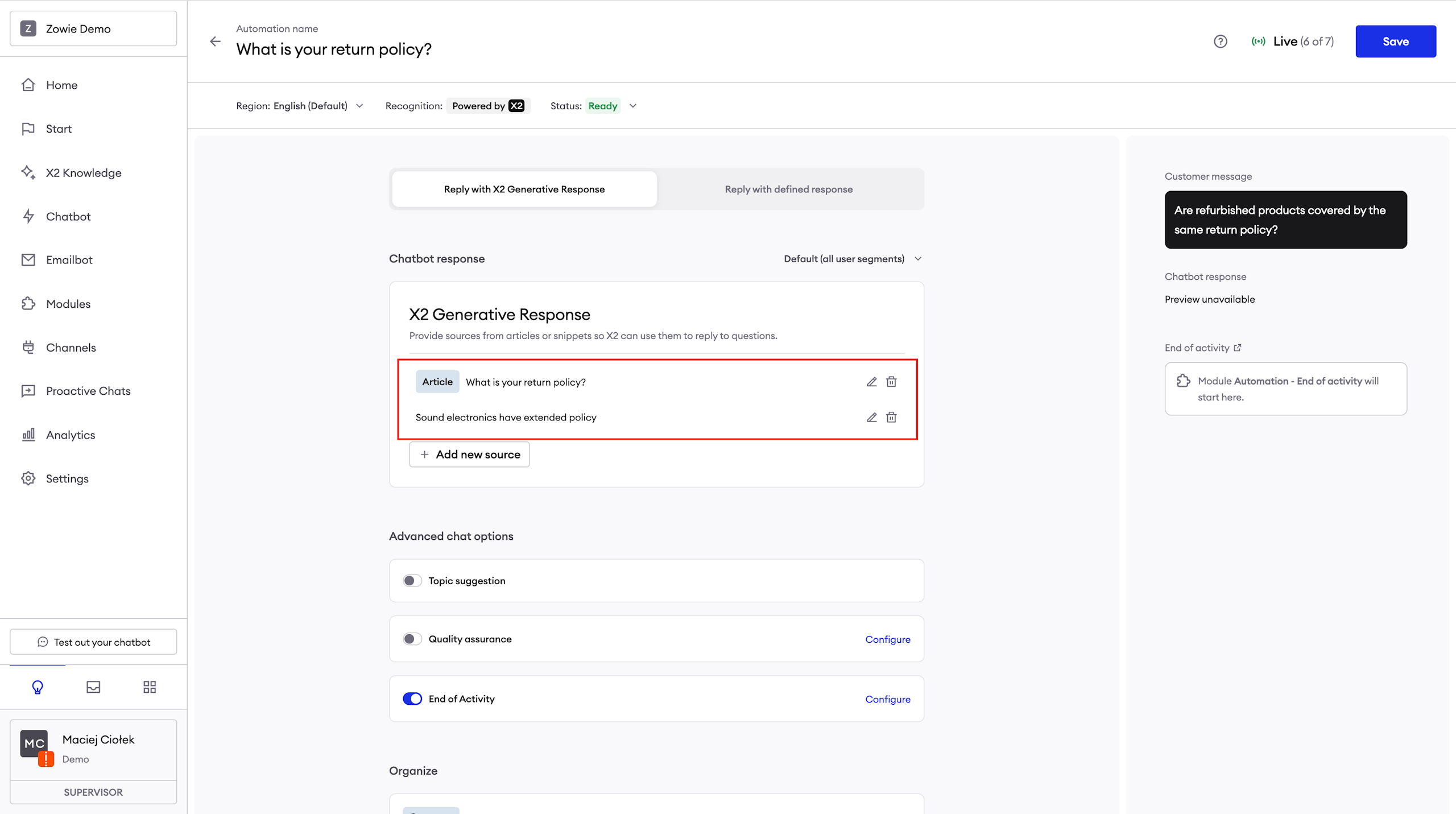
Switch to the Reply with X2 Generative Responses tab and click Add new source. This allows you to incorporate connected sources, like Zendesk Help Center, directing X2 on the specific content to use for responses.
If an article or website lacks certain information, you can either edit it or utilize the From custom snippet tab to add the necessary context for X2. This dual-source approach enhances the precision of Zowie X2's responses.
The strength of Guided Answers lies in combining the E-commerce Knowledge Base's accurate intent recognition with Zowie X2's personalized response capabilities.
You can also integrate custom-trained automations for further refinement. Additionally, the Reply with defined response option is available for complete control over certain interactions.
Pro Tip:Start transitioning your automations to X2 in phases, gradually transitioning them to the “Reply with Generative Response” setup will ensure optimal performance and improve your monitoring capabilities during the transition.
Configuring Creative Answers in Zowie X2
For inquiries that don't align with established automations, Zowie X2's Creative Answers can be a flexible solution.
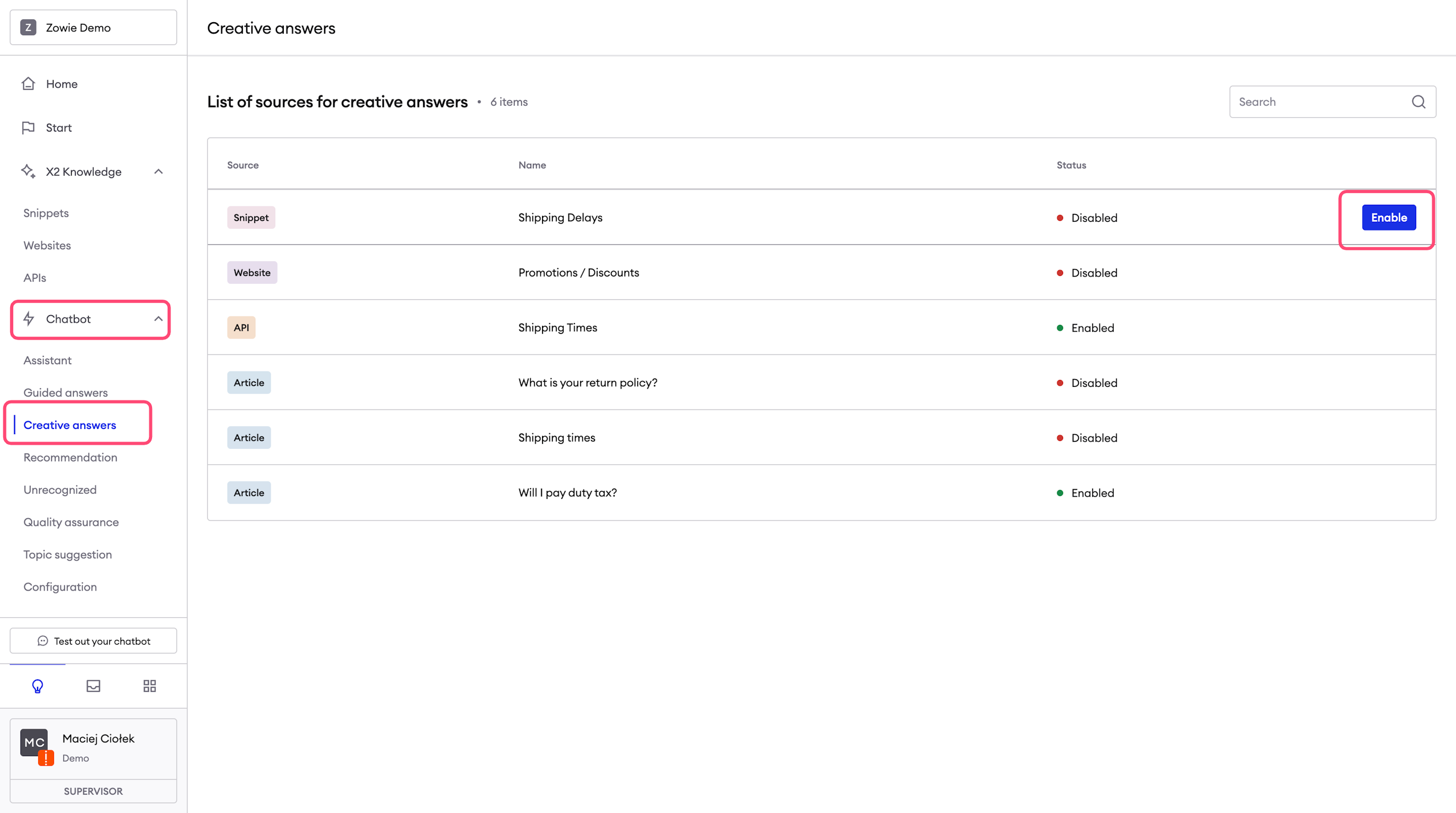
To enable this feature, navigate to Chatbot → Chatbot → Creative answers, where you can easily activate or deactivate it for different sections of the X2 Knowledge Base.
This mode allows Zowie X2 to autonomously generate answers, offering broader response options.
However, please be mindful of its use, as it may occasionally lead to less precise responses.
Pro Tip:This option is ideal for scenarios where varied and creative responses are beneficial.
Updated over 1 year ago