
Permissions and versions
Permissions and versions
Three separate checks run on every call your assistant makes.
- What you agreed to when you connected. Zowie's consent screen lists groups of permissions, called scopes, and you tick the ones you want to give. Your sign-in is then stored by the AI client as a token, the credential it sends with every request, and that token carries only the scopes you ticked.
- What your own Zowie account may do. You have to be a member of the environment and hold the matching permission (for example
PROCESS_VIEWto read processes,PROCESS_UPDATEto edit them). These are the same permissions that govern the Zowie UI. - What the AI agent itself allows. Each AI agent has its own setting, What can agents do?, described below.
A call fails if any of the three says no.
What you grant at consent time
These are the permissions as they appear on the consent screen, in the order you will see them.
| Permission | What it covers |
|---|---|
| List environments & AI Agents | See which environments and AI Agents you can access. |
| Read configuration & conversations | View AI Agent configuration and interaction history — transcripts, event logs and the prompts behind them. |
| Edit the staging version | Create and update configuration on the staging version only, never production. |
| Publish to production | Promote reviewed changes to the live production version, and edit the few things that have no staging copy. Granted on top of Edit the staging version, never on its own. |
| Read usage analytics | Access aggregated usage and performance analytics. Only for accounts onboarded to Unified Data Access. |
| Test conversations | Hold test conversations with the AI agent to verify changes. |
Three things worth knowing about that screen.
The first two cannot be unticked. List environments & AI Agents and Read configuration & conversations are the minimum the connection needs to work at all, so they are granted and fixed.
Most clients will never offer you Publish to production. It is not granted by default to any AI client. If you need it, talk to your Zowie contact.
Grant only what you need. You can reconnect later and grant more. The assistant cannot even see the tools behind a permission you did not tick — they are filtered out of the list it is given.
STAGING and LIVE
Your configuration exists in two copies. LIVE is the published one, the version real customers are talking to right now. STAGING is the draft you work on, and customers never see it until you publish it in the Zowie UI.
This choice applies to configuration only — processes, intents, guidances, the persona, data types. Whenever the assistant reads or writes one of those, it works on STAGING unless it is told otherwise, and it asks for LIVE explicitly when you want to know what customers are getting right now rather than what your draft says. A useful way to phrase it: "show me the returns process as it is published, not my draft".
Writes are stricter. Everything the assistant creates or updates lands on STAGING, full stop. Publishing STAGING to LIVE is done in the Zowie UI, not through MCP, so the review step stays where it always was.
There is one exception, and it is worth knowing before you meet it: contact reasons have no draft copy. Editing them hits the live AI agent immediately, which is why that edit needs Publish to production and an AI agent set to Write to live. Past conversations keep the classification they already have.
Conversations are not versioned, and this is the part people expect to be. Interactions, their transcripts and their logs are simply what happened. There is no draft copy of a conversation and no version to pick, so when you hand the assistant an interaction id it reads the real thing — whether that conversation came from a real customer or from your own testing. What tells them apart is the conversation's own version_tag, not a setting you choose. Knowledge policies, contact reasons and analytics are unversioned in the same way.
The per-agent gate: "What can agents do?"
Each AI agent has its own setting, What can agents do?, in the AI agent settings. It caps what any AI assistant connected over MCP may do to that agent, whatever permissions the connection carries. As the setting itself says, it does not override the access levels of the people on the agent — it only narrows what assistants may do.
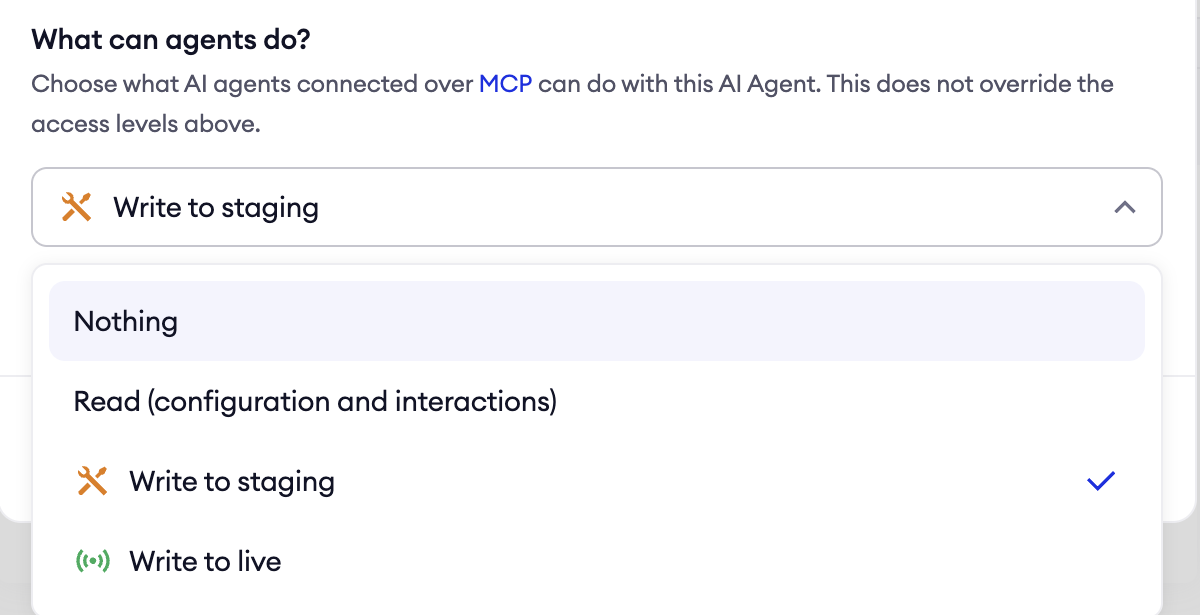
| Setting | Allows |
|---|---|
| Nothing | No MCP access to this AI agent at all. |
| Read (configuration and interactions) | All reads, analytics and test conversations. |
| Write to staging | The above, plus edits to the staging version. |
| Write to live | Everything, including edits that go live immediately. |
If nobody has touched it, it sits at Write to staging. That is the default for an agent with no explicit setting, so a new AI agent already allows staging edits over MCP. Set it to Nothing or Read on any agent where you do not want that.
The setting is checked at the moment a tool is actually used, not when the assistant loads its list of tools. So your assistant will still list write tools, and a call against an agent set to Read comes back with an explicit "agent access denied" error rather than silently doing nothing.
Analytics access
Analysis does not depend on this. Reading conversations, looking for a pattern across them, working out why something went wrong across a week of traffic — all of that runs on the ordinary read permission and works from the moment you connect. Only two tools sit behind Read usage analytics, and they are the ones that query your reporting tables directly.
What you get by adding them is scale and exact figures: numbers over months, broken down by contact reason or channel, instead of the assistant reading a sample of conversations and telling you what it saw. For a question like "what went wrong in these fifty chats" you do not need them. For "what is our automation rate month over month" you do.
They work only for workspaces onboarded to Unified Data Access, with the dataset assigned to your user. Ask your Zowie contact if you want them switched on. Two things to expect once they are. The data is loaded once a day, up to the previous midnight UTC, so today is never in it and an empty answer for today is correct rather than broken. And every query has a cap on how much data it may scan, so a very broad question can come back refused instead of answered.
Updated about 2 months ago